Your entire fleet
Sections, tags and environments. Live health, fleet search and cross-cluster resource comparison.
Works with your kubeconfigsA local-first Kubernetes IDE for the people who keep things running. Your fleet, your tools, your next move — together.
Free & MIT licensed. No account. No subscription.
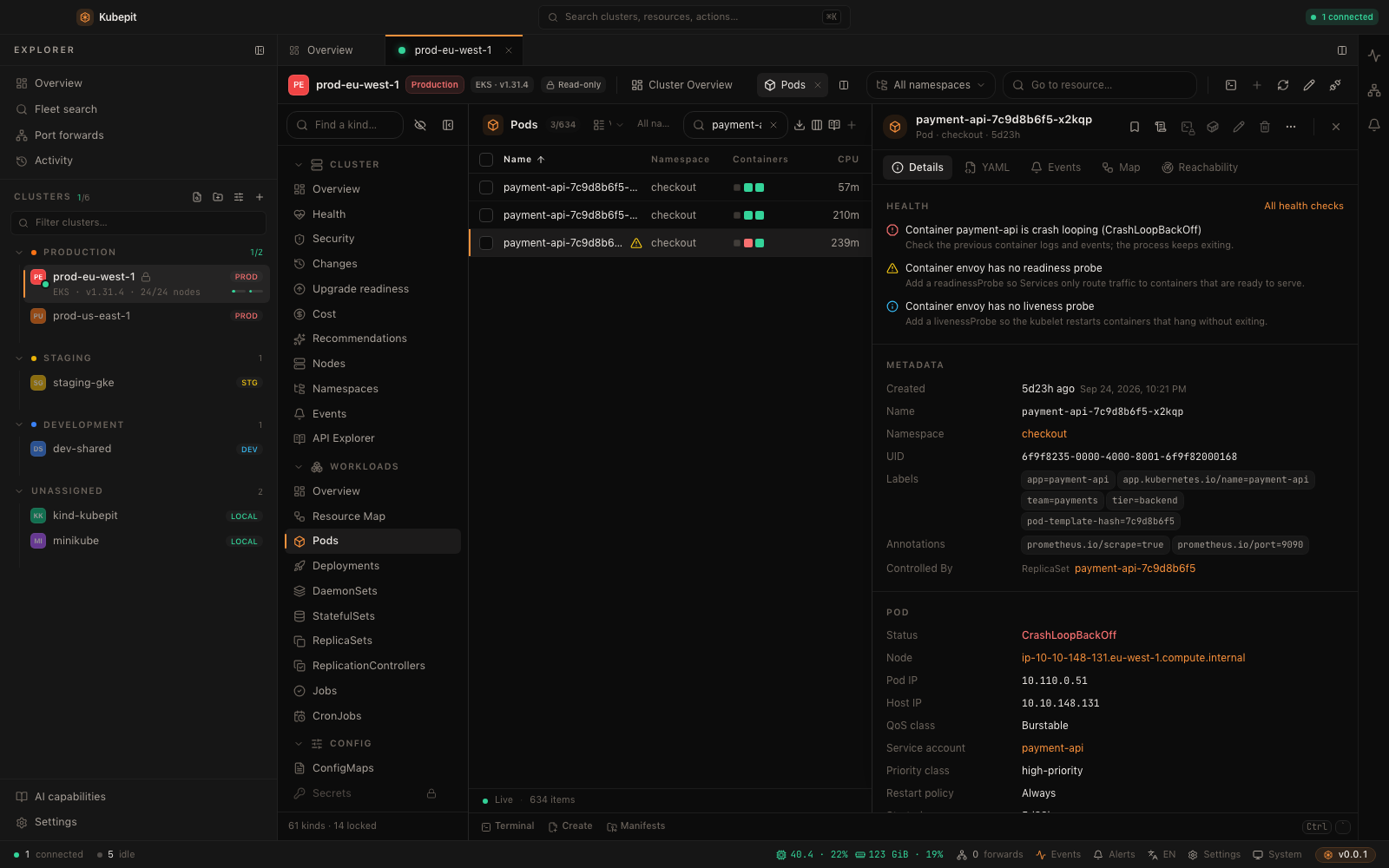 Make yourself at homeExplore the live demo
ONE CONNECTED WORKFLOW
The tools you reach for during an incident, connected by the context you usually have to carry yourself.
Group clusters by environment, watch fleet health, and find a resource across connected clusters. Keep the right context in view with split panes, pinned tabs and multiple windows.
Fleet dashboard · Cross-cluster search · Drift comparisonTry this in the demo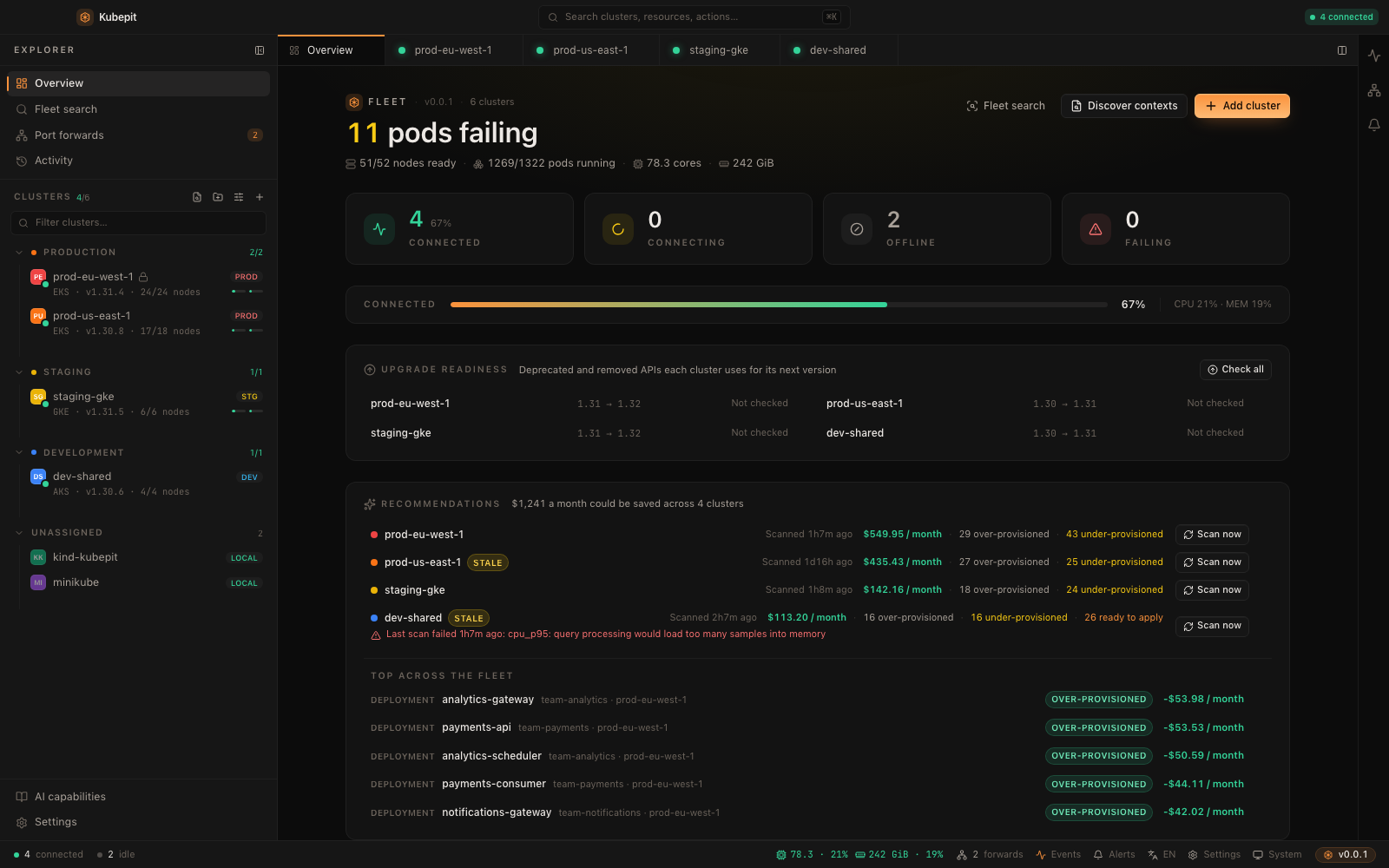
A DEEPER TOOLBOX
A broad set of operator workflows, built into one workbench. Explore what is available and what each integration needs.
Sections, tags and environments. Live health, fleet search and cross-cluster resource comparison.
Works with your kubeconfigsMerged pod logs, exec, attach, node shells, debug containers, file transfer and saved port forwards.
Shell features use kubectlBrowse charts, validate values, preview upgrades, inspect revision diffs and roll back releases.
Chart operations use HelmDiscover Argo CD and Flux resources, follow ownership and inspect reconciliation in one place.
Uses installed GitOps CRDsLive metrics and local history, with Prometheus queries and Loki logs when those services are available.
Basic metrics need metrics-serverExplore resource topology and explain standard NetworkPolicy decisions before chasing a connectivity issue.
Simulation is not a packet testInspect allocation estimates and right-sizing suggestions, with optional OpenCost or Kubecost data.
Estimates, not cloud invoicesReview observed changes, events and local action history. Compare revisions and prepare a reviewed revert.
Local history, not a cluster audit logInspect RBAC, Pod Security Standards, health and certificates. Read vulnerability reports from Trivy Operator.
Trivy reports need the operatorFind deprecated APIs in resources and Helm manifests. Review blockers, replacements and scan coverage.
Coverage follows the bundled API tableBuilt-in read-only guards, RBAC-aware actions, production confirmations and dry-run reviews.
Kubernetes RBAC is the security boundaryOpt in to your own provider, Ollama or supported local agents. Preview context and review suggested changes.
Remote providers receive approved contextCommand palette, vim-style navigation, configurable shortcuts and support for importing compatible k9s plugins.
LOCAL FIRST. OPEN BY DESIGN.
Kubepit is a community project under the MIT license. The code is open, the workflow is yours, and there is no paid edition to unlock.
Read the MIT licenseConnect with your own kubeconfigs. State and observed history live locally. Imported configurations do not rewrite your originals.
Use Kubepit without AI, bring your own provider, or connect Ollama. Review the selected, redacted context before sending it. External providers can receive that content.
Read-only mode guards built-in mutations. Kubernetes RBAC remains the security boundary: terminals and custom commands can still use your credentials.
Kubepit is an early community project. Expect rough edges, share reproducible issues, and help improve the workflows you use every day.
FIND YOUR WORKFLOW
Great Kubernetes tools take different paths. Choose the working environment that fits how you think.
A community-maintained desktop IDE with an extension ecosystem. A natural fit if you want the familiar Lens-style experience and its extensions.
Explore FreelensA terminal-centered Kubernetes interface with fast navigation, resource views and plugins. A natural fit when your terminal is your home base.
Explore k9sA visual, local-first workspace that brings fleet context, investigation, reviewed changes and optional AI together — with keyboard-driven navigation built in.
Find your flowThese are workflow differences, not an exhaustive feature ranking. Other tools also support extensions, integrations and safety controls.
DESKTOP DOWNLOADS
Choose your system and processor. Every download here corresponds to a published package, with its version, checksum and signing status shown.
Checking published packages…
This is a pre-release. Start with a development environment and restricted credentials.
Select your processor to see the available download.
START WITH CURIOSITY
Try the actual interface with fixture clusters, or build the desktop app and connect your own environment.
Prefer to build it yourself? The desktop app and this website are open source. Platform dependencies and setup instructions are in the README.
git clone https://github.com/erdembas/kubepit.git
cd kubepit
pnpm install
pnpm devNode.js 22+, pnpm 9, Rust 1.89+, Tauri platform dependencies and kubectl. Install Helm for chart operations.
Read the setup guideTHE USEFUL DETAILS
Yes. Kubepit is MIT licensed, with no subscription, activation server or paid feature tier. Optional third-party services, AI providers and your infrastructure may have their own costs.
Only the in-memory mock backend shipped with the project. Clusters, logs, metrics and actions are simulated. It cannot connect to your clusters or execute real Kubernetes commands. Reloading resets backend changes; some interface preferences remain in your browser.
No. There is no Kubepit account or telemetry, but cluster access needs a network. Enabled integrations, AI providers, chart discovery and update checks can contact their configured services. The desktop UI also loads its font from Google Fonts.
Settings, cluster definitions and observed history are stored under ~/.kubepit; interface preferences use local browser storage. History uses SQLite. Managed credentials use owner-only files or the optional OS keychain; subprocesses may need temporary kubeconfig files.
No. Resource exploration uses the Kubernetes API. Basic usage metrics need metrics-server; historical Prometheus queries, Loki logs, cost providers and Trivy reports need their respective services. AI is optional, and Ollama can run locally.
This is an early release, not a production-readiness guarantee. Start with a development cluster and restricted RBAC. Built-in confirmations and previews help you review actions, but do not replace access control, backups or your operational judgment.
Report a reproducible issue, improve a translation, test a platform or contribute code. Read the contribution guide first, use fixture data in tests and never include real kubeconfigs, tokens or sensitive logs in an issue.
Contribution guideBUILT IN THE OPEN
Try it. Question it. Make it yours.